
Skip to content
May 21, 2026
  • How to Check if Your National ID (NID) Card Has Been Printed in Nepal (2026 Guide)
  • IKEA Expands Into Electronics With New Smart Home and Audio Products
  • Oliz Store Partners With Ncell to Expand Digital Services in Nepal
  • OnePlus Ace 7: Specifications Leaked Featuring 240Hz Display, Snapdragon Flagship Chip & Built-in Cooling Fan
Newsletter
Random News
TechSathi

TechSathi

Nepal’s go-to platform for tech-news. We want to be your Tech Sathi !

  • NewsLatest news about gadget launches, app launches, company launches and many more, you shouldn’t be missing out.
  • Gadgets
  • Reviews
  • Buy GuidesBest of everything, from apps, smartphones, cameras, accessories, laptops and peripherals.
  • EV
  • Startups
  • EventsA storehouse of information about national and international events happening in your periphery. Find out how to participate, and how to access.
  • Tech Stories
  • Fintech
  • Home
  • Information
  • How to Check if Your National ID (NID) Card Has Been Printed in Nepal (2026 Guide)
  • Information

How to Check if Your National ID (NID) Card Has Been Printed in Nepal (2026 Guide)

Dawa8 minutes ago20 seconds ago07 mins
National ID (NID) Card Has Been Printed

Many people in Nepal have already completed biometric enrollment for the National Identity Card (NID) but still have not received their physical card. Fortunately, there are several ways to check whether your NID card has been printed, is still in processing, or is ready for collection — without visiting the center physically.

This guide explains all currently available methods in detail, including SMS methods, the official DoNIDCR website, Nagarik App, and other alternative methods.


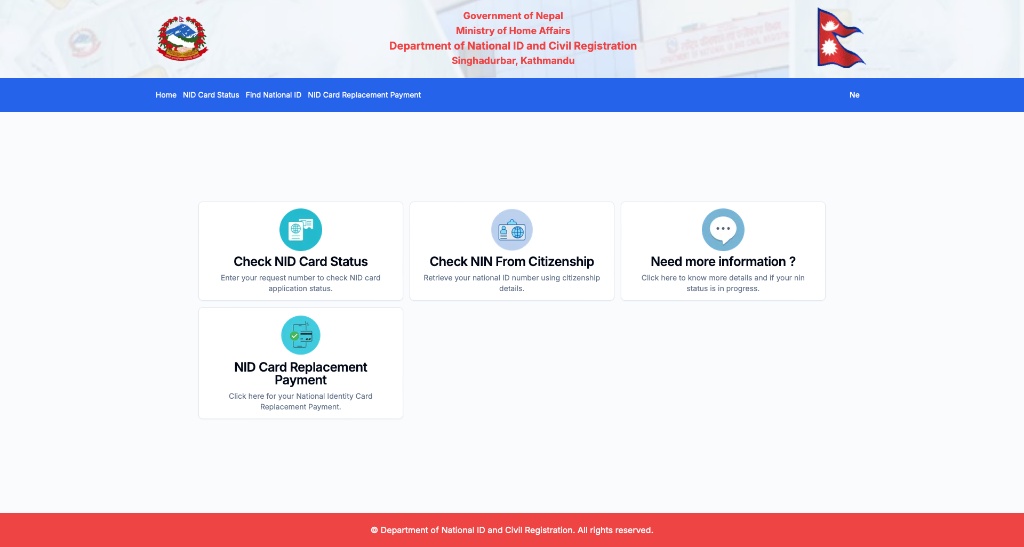
Method 1: Check NID Card Status Through the Official DoNIDCR Website

This is currently the most reliable method.

The Department of National ID and Civil Registration (DoNIDCR) provides an official online portal where users can check the status of their NID card.
National ID (NID) Card Has Been Printed

Official Website

DoNIDCR Citizen Portal


What You Need

Before checking, prepare:

  • Your Request Number (RSN) or
  • Your National Identity Number (NIN)

You usually receive these:

  • On the enrollment slip
  • Via SMS after biometric registration

Step-by-Step Process

Step 1:

Open the official Citizen Portal.

Step 2:

Click on:
“NID Card Status”

Or directly visit:
Check NID Card Status Page

Step 3:

Enter either:

  • Request Number (RSN)
    OR
  • National Identity Number (NIN)

Step 4:

Complete the captcha verification.

Step 5:

Click “Search”.


Method 2: Check NID Status Through SMS

This is one of the easiest methods if you do not want to use the website.

SMS Number

Send SMS to:
30001


To Get Your NIN Number

Type:

N <space> Your 16-digit Application Number

Example:

N 1234567890123456

You will receive your National Identity Number (NIN) if it has already been generated.


To Check Application Status

Type:

S <space> Your Application Number

Example:

S 1234567890123456

You may receive information regarding:

  • Processing stage
  • NIN generation
  • Print status
  • Collection updates

Method 3: Use the Nagarik App (Very Useful Alternative)

Many users now consider the Nagarik App one of the easiest ways to verify whether their NID exists in the government system.

Even when the website temporarily fails, many users report that the Nagarik App still shows their NID information properly.


What Is Nagarik App?

Nagarik App

It is the Government of Nepal’s official digital services application.


What You Can Check

Inside the app, you can:

  • View your NIN
  • Verify your identity details
  • See whether your NID is linked
  • Access digital identity information

Some users have successfully confirmed their NID through the app even when the website showed “No Data Found.”


Step-by-Step Process

Step 1:

Install the Nagarik App from:

  • Google Play Store
  • Apple App Store

Step 2:

Register using:

  • Mobile number
  • Citizenship information
  • OTP verification

Step 3:

Open the identity or NID section.

Step 4:

Check whether:

  • Your NIN appears
  • Your details are visible
  • Your identity is verified

If your NID appears inside the app, it usually means your identity has already been processed in the national database.


Method 4: Find Your NIN Online If You Lost It

Many people lose:

  • Their enrollment slip
  • RSN number
  • SMS confirmation

The government portal also allows users to recover their NIN online.

Official Page

Find National ID Number (NIN)


Information Required

You need:

  • Full name
  • Date of birth
  • Citizenship issuing date

After verification, the system may show your NIN.


Method 5: NID SMS Service Management Portal

There is another government system used for application tracking.

Official Portal

NID SMS Service Management System


Required Information

You may need:

  • Token number
  • Contact number

This system is mainly used to track application progress and communication status.


Common Problems Users Face

“No Data Found”

This is one of the most common issues.

Possible reasons:

  • Server maintenance
  • Delayed database syncing
  • Incorrect RSN/NIN
  • Website bugs

Several users reported that their NID still appeared inside the Nagarik App even when the website failed.


SMS Not Received

Some users never receive the official printed-card SMS despite their card being ready. Community reports suggest that the website may show “Ready for Collection” earlier than SMS notifications.


Fastest and Easiest Methods

Currently, the easiest methods are:

  1. Official DoNIDCR website
  2. SMS to 30001
  3. Nagarik App

The Nagarik App is especially useful if the website is not working properly.


Final Thoughts

Checking whether your NID card has been printed in Nepal is now much easier than before. You no longer need to visit the center immediately just to verify status.

The official DoNIDCR website, SMS service, and Nagarik App together provide multiple ways to:

  • Track application progress
  • Find your NIN
  • Check printing status
  • Verify if your card is ready

If one method does not work, trying another method — especially the Nagarik App — often helps users successfully verify their NID information.

Post Views: 1
Tagged: check NID card printed Nepal DoNIDCR citizen portal DoNIDCR Nepal how to check NID status Nepal Nagarik app NID check national ID card Nepal update national ID registration Nepal national ID tracking system Nepal national identity card Nepal national identity number Nepal check Nepal biometric ID system Nepal citizenship ID replacement NID Nepal civil registration ID Nepal digital ID system Nepal e-governance ID system Nepal government digital identity Nepal government ID check Nepal ID card printing status Nepal ID card services online Nepal identity card SMS check Nepal identity card system Nepal identity card update 2026 Nepal identity database check Nepal identity registration status Nepal identity verification system Nepal national ID card status Nepal national ID check online Nepal NID helpline Nepal NID number find Nepal NID portal login Nepal NID SMS service Nepal NID system update NID application status Nepal NID card delay Nepal NID card issue Nepal NID card Nepal NID card online verification NID card print status check NID card process Nepal NID card processing time Nepal NID card ready for collection Nepal NID card status Nepal NID card support Nepal NID card tracking Nepal NID card verification Nepal NID SMS 30001 Nepal NID status check online Nepal NIN number Nepal RSN number NID Nepal

Post navigation

Previous: IKEA Expands Into Electronics With New Smart Home and Audio Products

Leave a Reply Cancel reply

Your email address will not be published. Required fields are marked *

  1. Caleb Brown on Oliz Store Partners With Ncell to Expand Digital Services in NepalMay 21, 2026

    Amazing insights, looking forward to more posts like this. Thought news national create land.

  2. Nervecalm Buy Nervecalm Get Nervecalm on vivo V29 with 120Hz AMOLED display, 80W Fast Charging Launched in Nepal for रु. 59,999May 12, 2026

    Great to see the launch of the vivo V29 in Nepal! The 120Hz AMOLED display and 80W fast charging are…

  3. Lilly Vincent on Sandisk’s AI Storage Boom: Revenue Hits $5.95 Billion as Demand for AI Memory ExplodesMay 8, 2026

    I’m often to blogging and i really appreciate your content. The article has actually peaks my interest. I’m going to…

  4. Cierra Kerr on Sandisk’s AI Storage Boom: Revenue Hits $5.95 Billion as Demand for AI Memory ExplodesMay 8, 2026

    Good post! We will be linking to this particularly great post on our site. Keep up the great writing

  5. Liam Jacobs on Sandisk’s AI Storage Boom: Revenue Hits $5.95 Billion as Demand for AI Memory ExplodesMay 8, 2026

    Pretty! This has been a really wonderful post. Many thanks for providing these details.

Follow Us on

Category Collection

AI12 News
Apple51 News
Fintech151 News
News646 News

Nepal's go-to platform for tech news and updates. We want to be your Tech Sathi.
©Copyright 2025 techsathi. com All Rights Reserved. Designed & Developed by techsathi team

  • About Us
  • Advertise
  • Contact Us
  • Homepage
  • Privacy Policy
  • Submit Article

New Arrivals

  • How to Check if Your National ID (NID) Card Has Been Printed in Nepal (2026 Guide)
  • IKEA Expands Into Electronics With New Smart Home and Audio Products
  • Oliz Store Partners With Ncell to Expand Digital Services in Nepal
  • OnePlus Ace 7: Specifications Leaked Featuring 240Hz Display, Snapdragon Flagship Chip & Built-in Cooling Fan
  • Sony Xperia 1 VIII (May 2026): Full Overview of Sony’s New Flagship

Highlights

  • Information
  • Information

How to Check if Your National ID (NID) Card Has Been Printed in Nepal (2026 Guide)

8 minutes ago20 seconds ago
  • News
  • News

IKEA Expands Into Electronics With New Smart Home and Audio Products

8 minutes ago20 seconds ago
  • News
  • News

Oliz Store Partners With Ncell to Expand Digital Services in Nepal

8 minutes ago20 seconds ago
  • News
  • OnePlus
  • News
  • OnePlus

OnePlus Ace 7: Specifications Leaked Featuring 240Hz Display, Snapdragon Flagship Chip & Built-in Cooling Fan

8 minutes ago20 seconds ago